
Aller au contenu
View in the app

A better way to browse. Learn more.

Association jeux de société Lyon - Les Aventuriers du Rhône

A full-screen app on your home screen with push notifications, badges and more.

To install this app on iOS and iPadOS
  1. Tap the Share icon in Safari
  2. Scroll the menu and tap Add to Home Screen.
  3. Tap Add in the top-right corner.
To install this app on Android
  1. Tap the 3-dot menu (⋮) in the top-right corner of the browser.
  2. Tap Add to Home screen or Install app.
  3. Confirm by tapping Install.

Je donne ma langue au chat

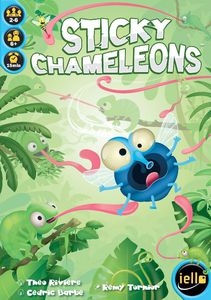
On a poursuivi la soirée sur du lourd de chez lourd. On avait le choix entre Terra Mystica et une petite nouveauté, Sticky Chamelons et bien nous en a pris de choisir ce dernier ! ;)


Clairement le coup de cœur débilos de la soirée. Je suis archi-nul aux jeux où il faut faire preuve de rapidité et d'observation, mais celui-là est tellement fendard qu'on se fiche bien de savoir qui gagne du moment qu'on balance sa main collante à tout va.


On va en prendre quelques uns pour en offrir à Noël et pas forcément qu'à des mômes. :)

Retour utilisateur

Commentaires recommandés

Il n’y a aucun commentaire à afficher.

Rejoindre la conversation

Vous pouvez publier maintenant et vous inscrire plus tard. Si vous avez un compte, connectez-vous maintenant pour publier avec votre compte.

Invité
Ajouter un commentaire…

Account

Navigation

Rechercher

Rechercher

Configure browser push notifications

Chrome (Android)
  1. Tap the lock icon next to the address bar.
  2. Tap Permissions → Notifications.
  3. Adjust your preference.
Chrome (Desktop)
  1. Click the padlock icon in the address bar.
  2. Select Site settings.
  3. Find Notifications and adjust your preference.